22.34 add A New Appointment Type. Version 1.0. Last updated January 2026.
Add a New Appointment Type
Contractor Workspace has a number of default appointment types. These can be renamed, or new ones added.
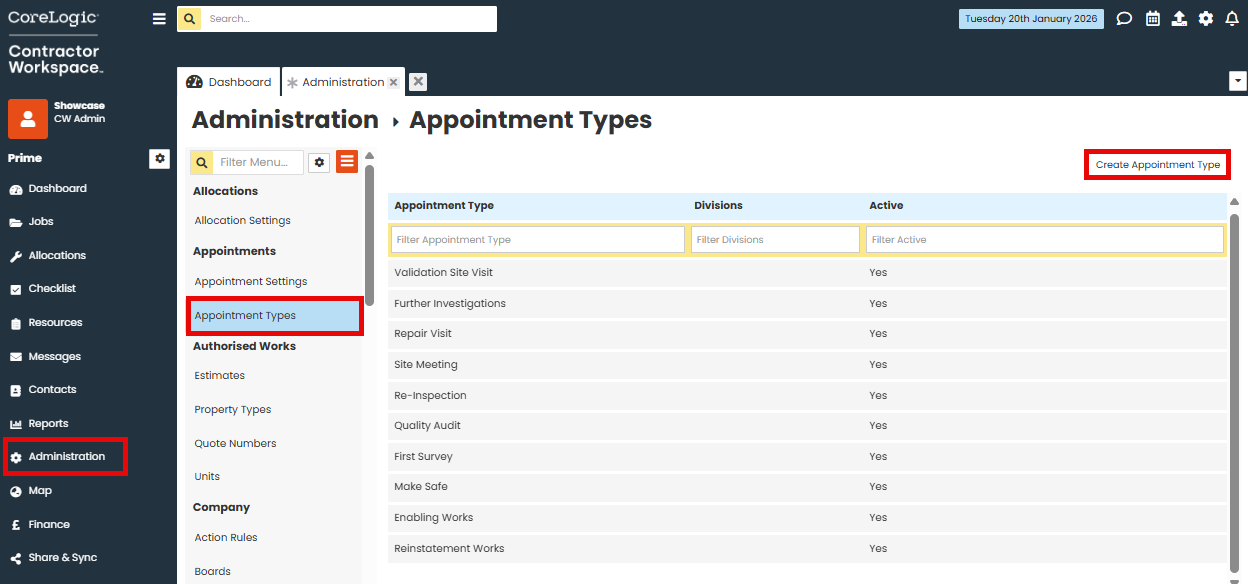
Go to Administration.
Under Appointments, click on Appointment Types.
Click Create Appointment Type.
Label your Appointment Type.
You may link the appointment type to a division if required.
Ensure the Active box is checked (you can uncheck this in future if you wish to make a document type not visible).
Save changes.

Was this article helpful?
That’s Great!
Thank you for your feedback
Sorry! We couldn't be helpful
Thank you for your feedback
Feedback sent
We appreciate your effort and will try to fix the article