22.25 Add Account Numbers. Version 1.0. Last updated January 2026
Add Account Numbers
This guide will show you how to add your Account Numbers or your 'Chart Of Accounts' from your accounting software. These account numbers need to match with exactly what is in your accounting software so when integrating with these programs they will successfully talk to one another.
Note - You only need to enter the Account Numbers for invoices you will create in Contractor Workspace, you do not need every account number from your 'Chart of Accounts'.
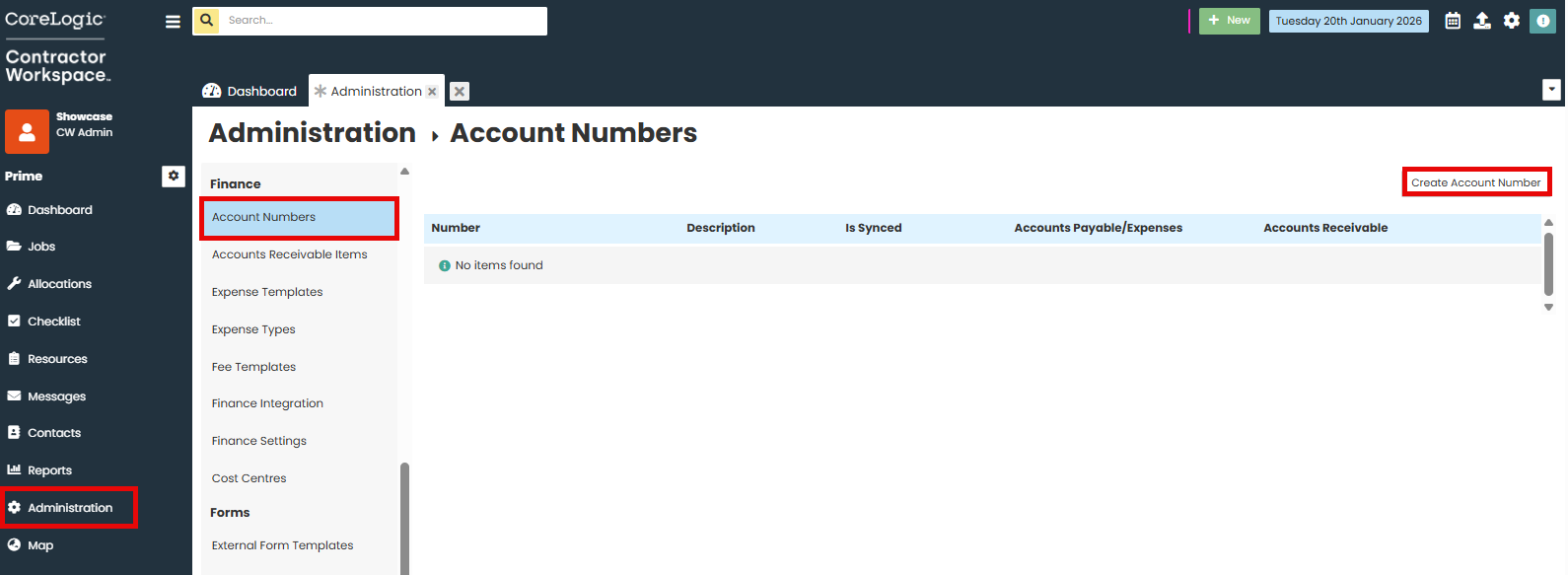
Go to Administration.
In the Finance section, click on Account Numbers.
Select Create Account Number.
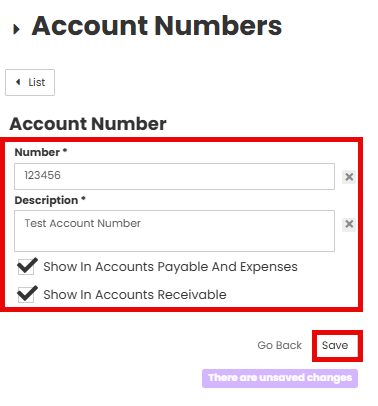
Enter the account number and the name of the account in the text boxes. If you have already integrated with your accounting software you will need to select what 'Company' the account number links to.
Select the appropriate check box to show the account number in Accounts Payable or Accounts Receivable.
The new account will appear in the list

Was this article helpful?
That’s Great!
Thank you for your feedback
Sorry! We couldn't be helpful
Thank you for your feedback
Feedback sent
We appreciate your effort and will try to fix the article