22.31 Add A New Document Type. Version 1.0. Last updated January 2026.
Add A New Document Type
This guide details how to add a new document type, and how to select which document types display as options when creating new pdf form templates.
Follow the below steps to add a new document type. These are the options available when uploading documents onto a job, and are the "folders" displayed under Documents within a job.
Go to Administration.
Under Company, click on Document Types.
Click Create Document Type.

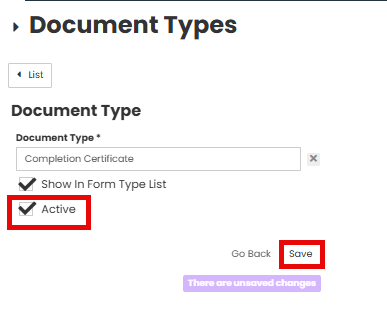
Name your Document Type

You can choose whether document types show up in the dropdown list for Form Type when creating a pdf form template. This dictates which folder a pdf form will save under when generated. This can be done when creating the document type, or at a later date.
Check the Show in Form Type List box

Ensure the Active box is checked (you can uncheck this in future if you wish to make a document type not visible)
Save Changes
How To Add a Contact Relationship Type
Was this article helpful?
That’s Great!
Thank you for your feedback
Sorry! We couldn't be helpful
Thank you for your feedback
Feedback sent
We appreciate your effort and will try to fix the article