22.24 Add A New Timesheet Activity. Version 1.0. Last updated January 2026.
Add A New Timesheet Activity
Timesheet activities can be added by users with Administration rights.
Select Administration from the Company menu
Select Timesheet Activities
Select Create Timesheet Activity
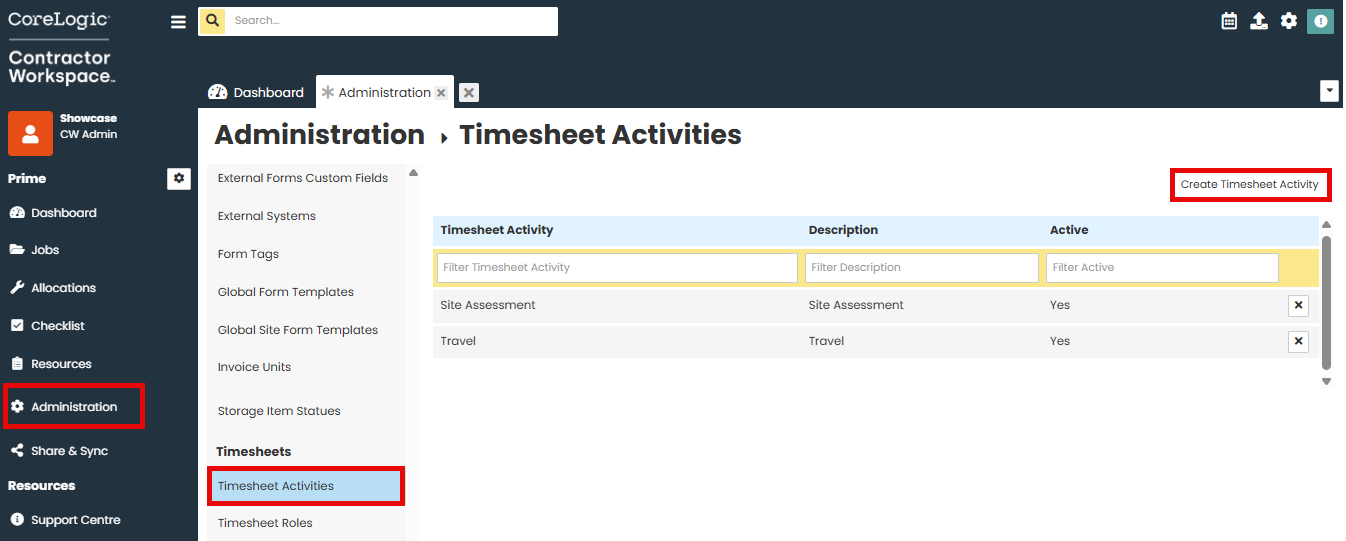
Select Enter the new activity and description in the text boxes.
Ensure 'Active' is selected
Click 'Save'.

The new activity will now appear in the activities list for use.
Was this article helpful?
That’s Great!
Thank you for your feedback
Sorry! We couldn't be helpful
Thank you for your feedback
Feedback sent
We appreciate your effort and will try to fix the article